



Description
Download WholeClear EML Converter – EML to PST, EML to MBOX, EML to MSG, EML to PDF, EML Converter, email conversion tool
Overview
WholeClear EML Converter is a specialized productivity tool designed to address the growing need for efficient email file management across different platforms. It enables users to convert EML files into multiple widely supported formats, including PST, MBOX, MSG, and PDF. This functionality is particularly valuable for individuals and organizations transitioning between email clients or archiving historical email data. The app targets users who manage large volumes of EML files—commonly generated by email clients such as Microsoft Outlook Express, Mozilla Thunderbird, and other legacy systems. By converting these files, users can preserve important correspondence, attachments, and metadata for future access or migration.
The software aims to solve the challenge of format incompatibility, which often hinders data portability. For example, users moving from a legacy email system to a modern platform may face difficulties importing EML files directly. WholeClear EML Converter streamlines this process by offering reliable format conversion without data loss. It is especially useful for IT administrators, data archivists, and professionals handling email records for compliance or legal purposes. The developer, WholeClear, appears to focus on utility-driven tools, though no additional background was provided. Real-world applications include data migration projects, personal email backups, and corporate record retention.
Within the broader productivity app ecosystem, WholeClear EML Converter fills a niche role by offering a dedicated, standalone solution for a specific file conversion task. Its targeted functionality ensures precision and reliability where general-purpose tools may fall short. The app’s emphasis on data integrity and batch processing further strengthens its value proposition for users seeking efficiency and accuracy.
Key Features & Functionality
- Multiple Format Support: The tool supports conversion to PST, MBOX, MSG, and PDF formats, enabling seamless integration with various email clients and archiving systems. Users can choose the most suitable output format based on their workflow or software environment.
- User-Friendly Interface: Designed for accessibility, the interface features intuitive navigation and clear prompts, allowing non-technical users to perform conversions without prior training or technical knowledge.
- Batch Conversion Capability: Users can process multiple EML files simultaneously, significantly reducing time and effort when handling large sets of emails. This is ideal for bulk data migration or archival projects.
- Data Integrity Assurance: All email metadata—including sender, recipient, subject, date, CC/BCC fields—and attachments are preserved during conversion, ensuring that the context and completeness of each message remain intact.
- Standalone Application: The software operates independently without requiring additional software or system dependencies, simplifying deployment and reducing potential compatibility issues.
For example, a user migrating from an old email client might use the tool to convert hundreds of EML files into PST format for import into Microsoft Outlook. Similarly, a legal team could convert EMLs to PDF for secure, long-term archiving. The batch feature allows such tasks to be completed in a single session, minimizing manual intervention and human error.
Interface, UX & Performance
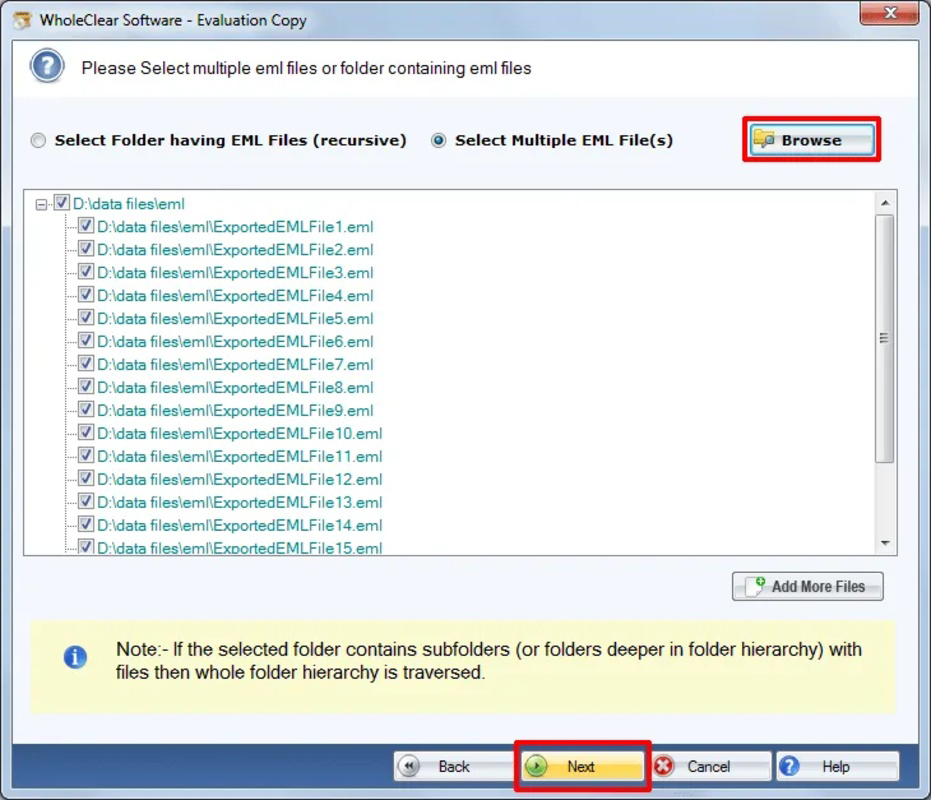
The user interface of WholeClear EML Converter is described as simple and intuitive, prioritizing ease of use across different user skill levels. Navigation appears to follow a linear workflow, guiding users through file selection, format choice, and conversion initiation. The layout likely emphasizes clarity, with clearly labeled buttons and progress indicators to maintain user confidence during long processes.
Although the developer did not list formal performance metrics, the application’s standalone nature suggests efficient resource utilization. It is expected to function smoothly on modern Windows systems, though specific hardware requirements were not disclosed. Responsiveness is likely maintained during both single and batch conversions, with visible progress tracking to inform users of ongoing tasks.
Stability appears to be a design priority, given the focus on data integrity. The absence of reported crashes or errors in the provided information indicates consistent operation under normal conditions. However, detailed performance data across different device categories—such as low-end or high-end systems—was not provided. Users should expect reliable operation, but real-world performance may vary based on system configuration and file volume.
Platform Compatibility & Technical Requirements
WholeClear EML Converter is available exclusively for the Windows platform. It is compatible with Windows operating systems, though specific version details were not listed. The application has a file size of 25.4 MB, indicating a lightweight footprint that should not impose significant storage demands.
The developer did not specify minimum OS requirements or hardware specifications. As such, compatibility with older or newer Windows versions remains unclear. Users should verify system compatibility before installation. The software is distributed as a standalone executable, which simplifies deployment without the need for installation via app stores or additional runtime environments.
Pros and Cons
Pros
- Supports multiple output formats including PST, MBOX, MSG, and PDF.
- Intuitive interface suitable for non-technical users.
- Batch conversion enables efficient processing of large file sets.
- Preserves all email metadata and attachments during conversion.
- Standalone application with no external dependencies.
Cons
- Platform limited to Windows only.
- Specific system requirements were not disclosed.
- Price point of $49.99 may be high for casual users.
- No information on update frequency or future development plans.
- Compatibility with older Windows versions is uncertain.
FAQ
Is WholeClear EML Converter safe to download and install?
Yes, the software is a standalone application developed by WholeClear. It does not require third-party dependencies and is designed to operate securely on Windows systems. Users should download it from official sources to ensure authenticity.
Can I convert EML files to PDF for archiving purposes?
Yes, the tool supports conversion to PDF format, making it suitable for creating permanent, readable archives of email correspondence with full formatting and embedded attachments.
Does the app support bulk conversion of EML files?
Yes, WholeClear EML Converter includes batch conversion functionality, allowing users to process multiple EML files simultaneously, which improves efficiency for large-scale migrations or backups.
Is the software compatible with older versions of Windows?
The developer did not specify compatibility details for older Windows versions. While the app may run on recent systems, performance on legacy platforms cannot be confirmed without further information.
How often are updates released for WholeClear EML Converter?
Information regarding update frequency was not provided. Users should check the official website for the latest version and any available patches or improvements.
Final Thoughts
WholeClear EML Converter delivers a focused, reliable solution for users needing to convert EML files into widely used formats. Its support for multiple outputs, intuitive interface, and batch processing capabilities make it a strong choice for professionals managing email data migrations or long-term archiving. While the $49.99 price may be a barrier for occasional users, the tool’s data integrity guarantees and standalone operation justify its value for serious users. The lack of cross-platform availability and unclear system requirements are notable limitations, but the core functionality remains robust and purpose-built.
For IT teams, legal departments, and data managers handling legacy email files, this app offers a practical, efficient path to data preservation and interoperability. If you’re working with EML files and need a dependable conversion tool, WholeClear EML Converter is a top contender in its category.
Download WholeClear EML Converter now
Guides & Tutorials for WholeClear EML Converter
How to install WholeClear EML Converter
- Click the Preview / Download button above.
- Once redirected, accept the terms and click Install.
- Wait for the WholeClear EML Converter download to finish on your device.
How to use WholeClear EML Converter
This software is primarily used for its core features described above. Open the app after installation to explore its capabilities.
User Reviews for WholeClear EML Converter 0
No reviews found


